
How to Clean Up Your Messages on Mac ASAP
If you often find yourself inundated with one-time codes, political messages, and marketing texts on your Mac, there’s an effective way to declutter your Messages app. With just a few simple steps, you can easily remove those unwanted texts and create a cleaner messaging experience.

One reason I love using Apple products is that apps can be synced across multiple devices. I love being able to check my text messages on my Mac laptop!
If you often find yourself inundated with one-time codes, political messages, and marketing texts on your Mac, there’s an effective way to declutter your Messages app. With just a few simple steps, you can easily remove those unwanted texts and create a cleaner messaging experience. Here’s how to do it:
Step-by-Step Guide
Open Messages: Launch the Messages app on your Mac.
Access Unknown Senders: At the top of the window, click on View and select Unknown Senders from the dropdown menu. This will filter your messages to show only those from contacts not saved in your address book.
Review Your Messages: Take a moment to scan through the list of unknown senders. Check for any messages from people you might want to save, such as a new friend or a service provider you’ve been communicating with.
Save Important Contacts: If you find someone you need to keep, make sure to add them to your contacts before proceeding. This ensures you don’t accidentally delete important messages.
Select All Messages: Click on the top message in the list, scroll down to the bottom, and then hold the Shift key while clicking the last message. This will select all the texts in the Unknown Senders list.
Delete the Messages: Right-click (or use a two-finger tap if you’re on a trackpad) and choose Delete from the context menu. Confirm the deletion and all those unwanted texts will be removed in one go!
Hot tip: This is just one of many examples of things that are easier to do on your COMPUTER vs. on your phone.
By following these steps, you can quickly clear out unwanted messages and keep your Messages app organized and efficient. Happy decluttering!
Mastering the Starred Feature in Gmail
If you’ve ever taken a deep dive into your Gmail account, you may have stumbled upon a long list of starred emails, often with no clear memory of why they were marked. As I work with clients to declutter their inboxes, this is a common scenario. Today, let’s explore the best ways to use the star feature in Gmail and how to keep your inbox organized.

Have you ever taken a close look at your inbox and stumbled upon a long list of starred emails, often with no clear memory of why they were marked? When I work with my clients to clear out their Gmail, they often find hundreds of starred emails and have no idea why!
Today, let’s explore the best ways to use the star feature in Gmail and how to keep your inbox organized.
The Purpose of the Star Feature
The star in Gmail is a powerful tool for flagging emails that you need to reference later. Here are some effective uses for starring emails:
⭐️ School Supplies List: Save important information from teachers that you’ll need for back-to-school shopping.
⭐️ Concert Tickets: Easily access your tickets when heading to an event this weekend.
⭐️ Airbnb Check-in Instructions: Keep travel information handy for a smooth arrival.
⭐️ Travel Reservations: Quickly find flight itineraries or hotel bookings.
⭐️ Shipping Confirmations: Track your online orders effortlessly.
Think of the Starred section as your “Pending” file—items you need to keep on hand temporarily.
How to Maintain an Organized Starred Section
To keep your Gmail efficient, it’s crucial to manage your starred emails regularly. Here’s a step-by-step guide to freshen up your Starred section:
Review Your Starred Emails:
Navigate to the Starred section in Gmail. You might be surprised by the number of emails you’ve starred over time. It’s probably time to clear out those old starred emails and start with a clean slate!
Select All Starred Emails:
Click the checkbox at the top left to select all starred emails on the page. If you have more than one page, you may need to do this for each page or use the “Select All Conversations” option.
Remove the Star:
After selecting the emails, click the star icon or the “Remove Star” option. This will clear out old emails that you no longer need to keep flagged.
Add New Stars as Needed:
Go through your inbox and star any important emails that you need to reference in the future. Aim to keep your starred emails to around 10 at a time for optimal organization.
Unstar When Done:
As you complete tasks related to starred emails or no longer need them, make sure to unstar and archive or delete them to maintain a clutter-free inbox.
By mastering the star feature in Gmail, you can enhance your email organization and efficiency. Use it to flag important emails for easy access, but remember to keep your starred section cleaned up by regularly unstarring items you no longer need. Ideally, you’ll have around 10 starred emails or less at any given time.
With these tips, you can enjoy a more streamlined Gmail experience and stay on top of your essential emails. Start today and transform your inbox into a well-organized workspace!
Switch to Priority Inbox in Gmail and Change Your Life!
Gmail’s Priority Inbox feature is a powerful tool that helps you manage your email more effectively by automatically sorting your messages based on their importance. Changing the priority setting can enhance your productivity and ensure you’re focusing on what matters most.

Gmail’s Priority Inbox feature is a powerful tool that helps you manage your email more effectively by automatically sorting your messages based on their importance. Changing the priority setting can enhance your productivity and ensure you’re focusing on what matters most. Here’s how to customize your Priority Inbox settings in Gmail.
Step-by-Step Guide to Change Priority Settings
Log into Your Gmail Account: Open your web browser and go to Gmail. Enter your credentials to access your account.
Access Settings:
In the top right corner of your Gmail interface, click on the gear icon (⚙️) to open the Settings menu.
From the dropdown, select See all settings.
Navigate to the Inbox Tab: Once you’re in the settings menu, click on the Inbox tab. This section allows you to customize how your inbox behaves.
Choose Your Inbox Type:
In the Inbox type section, you’ll see several options. To enable Priority Inbox, select Priority Inbox. This option will automatically sort your incoming emails based on factors such as previous interactions, importance, and more.
Customize Your Priority Inbox:
After selecting Priority Inbox, you can customize what appears in the different sections of your inbox. You can choose to show:
Important and Unread: Emails marked as important or unread will appear here.
Starred: Any emails you’ve starred will be displayed in this section.
Everything Else: All other emails will be sorted here.
Adjust these settings based on your preferences.
Set Importance Markers:
Scroll down to the Importance markers section. Here, you can decide whether Gmail should determine which emails are important automatically.
You can also mark messages manually by selecting the importance icon (the little yellow arrow) next to the email in your inbox.
Save Changes: After customizing your settings, don’t forget to scroll to the bottom and click Save Changes to apply your new settings.
Make the most of your priority inbox
Regularly Review Your Settings: As your email habits change, revisit your priority settings to ensure they align with your current needs.
Use Stars and Labels: Enhance your organization by using stars and labels in conjunction with the Priority Inbox.
Train Gmail: The more you interact with your inbox, marking emails as important or not, the better Gmail gets at understanding your preferences.
Changing the priority setting in Gmail can significantly improve your email management and help you stay on top of your most important messages. Enjoy a more organized email experience, and train your inbox to work FOR you, not against you!
Mastering Mac's Finder: Finally understand where and how to organize, save and find your files
Do you need help keeping your files, folders, and documents organized on your Mac? Fear not, because Finder is here to help! But let's face it, most of us need help figuring out how to use it.
When I first got my Mac last year, I was overwhelmed by my Mac's Finder. How do I know where something is saved? What do all those icons across the top mean? How can I get to my favorite folders?
After figuring out some tips and tricks, Finder became soooo helpful. In this blog, I'll show you how you can use Finder to better organize, declutter, and find files on your Mac.

Image by Vikiing on IconScout
Do you need help keeping your files, folders, and documents organized on your Mac? Fear not, because Finder is here to help! But let's face it, most of us need help figuring out how to use it.
When I first got my Mac last year, I was overwhelmed by my Mac's Finder. How do I know where something is saved? What do all those icons across the top mean? How can I get to my favorite folders?
After figuring out some tips and tricks, Finder became soooo helpful. In this blog, I'll show you how you can use Finder to better organize, declutter, and find files on your Mac.
You're going to be a Finder pro in no time, my friend.
Pssst ... watch this quick 8-minute video to see the tips in action!

Customizing the Sidebar (aka, that column on the left)
When you open Finder, you'll see a left sidebar with categories like Downloads, Recents, and AirDrop. It can be overwhelming, but don't worry; you can customize the sidebar to show your favorites. These are the files, folders, or documents that you need to access regularly. To add an item to the sidebar, simply drag it from its location and drop it onto the sidebar. To remove an item, right-click or double-tap on it and select "Remove from Sidebar."
Customizing the Toolbar (aka, the icons on the top of the window)
Another way to make Finder work for you is to customize the toolbar. It shows a few essential icons by default, but you can customize it to include the features you use most frequently. To customize it, right-click or double-tap it and select "Customize Toolbar." You'll see the icons on the toolbar start to wiggle. From there, you can add or remove icons and rearrange them to suit your preferences. I recommend adding the following icons:
Delete
New Folder
Preview, and
Path
I also recommend changing the setting so that you see "Icon and Text," not just "Icon," especially as you're getting used to Finder.
Add "Path" to the Toolbar
The Path function is another useful feature of Finder. It shows you the breadcrumb trail of the folders you've opened, which helps keep track of where you are. To access it, click the View menu and select "Show Path Bar." This displays the Path bar at the bottom of the Finder window. If you're working on a specific file, you can click on it and drag it to another folder using the Path bar.
Download Dropbox and/or Google Drive for Desktop
Finally, integrating your Google Drive and Dropbox accounts is a great way to optimize Finder. Integrating my Google Drive and Dropbox accounts was the icing on the cake. Having all my files in the Finder window saves me so much time. No more navigating to the website to access them! This means you can access all your files from the Finder window without having to navigate to the website.
Here's where to grab those desktop apps:
Take 5 minutes to try it now!
With these tips and tricks, you'll be zipping around your Mac's files in no time. Go ahead and watch the quick 8-minute video and customize your sidebar, toolbar, and Path function! And remember to integrate your Google Drive and Dropbox accounts for an even better experience.
How to Declutter Your Digital Life
It's time to organize your digital life!
I was recently featured in a Vox article about ways to declutter your digital life. Whether you're trying to figure out how to organize your phone or how to clean out your Gmail inbox, the Vox article is chock-full of super PRACTICAL strategies. You can find the full article here - Easy ways to organize your digital life, from photos to emails.
Below are some highlights from the article, including my favorite ways to jump start your digital decluttering and get your digital life under control, fast. Consider this your digital declutter checklist.

It's time to organize your digital life!
I was recently featured in a Vox article about ways to declutter your digital life. Whether you're trying to figure out how to organize your phone or how to clean out your Gmail inbox, the Vox article is chock-full of super PRACTICAL strategies. You can find the full article here - Easy ways to organize your digital life, from photos to emails.
Below are some highlights from the article, including my favorite ways to jump start your digital decluttering and get your digital life under control, fast. Consider this your digital declutter checklist.
1. Figure out the actual problem.
Often, we make our digital clutter problem bigger than it is. Before you start desperately Googling how to organize your life, it's helpful to take a step back and ask if it's really ALL of the digital stuff that is stressing you out. Or is it just one or two areas, like photos and files? Hone in on what needs the most attention/what's stressing you out the most and start THERE.
2. Start small.
Don't try to build out a big, complicated folder architecture for your electronic documents. Just start with a few simple folders, like Medical Records, School, or Cars. Put files into those folders and add more folders/structure as needed. Consider using a service like Dropbox. It's affordable and easy to use, and your files will be backed up to the cloud. Dropbox even has something called Dropbox Vault, where you can store more sensitive documents under an extra layer of security.
3. Use a naming convention.
From the Vox.com article: "If you have issues finding documents in Google Drive or Dropbox, try sprucing up the way you title your documents, Jefferson says. She likes to start with the date (for example, YEAR.MONTH.DAY) then a few words about the file. Say you’re saving copies of your kids’ report cards; you might use your child’s name and the semester or marking period in the name of the document. " This naming convention makes it so much easier to find and organize digital files!
4. Learn how to use the "labels" in Gmail.
Labels in Gmail are just folders with a fancy name. Get in the habit of labeling emails and then archiving them. This will remove them from your inbox, but they'll stay saved under that label for good.
From the article: "When it comes to email organization, Jefferson suggests creating folders, tabs, or labels if you use Gmail to categorize messages. 'I have a folder for online orders and a folder for my daughter and a folder for certain work projects,' she says. You can move or archive the emails to these specific folders and they’ll be out of your main inbox. It’s important to note that archiving does not delete emails, they’re just moved to another place, so archiving won’t free up any storage space."
Consider fancier apps to clean up email like Superhuman. The $30/month price tag is a bit steep, but I gotta say, I whiz through my emails at lightning speed with this program. (If you love keyboard shortcuts, you'll love Superhuman. For example, just typing "L" allows you to label an email in one step.) It almost makes my email declutter FUN. Almost.
5. Don't be afraid to "go nuclear" and archive.
If you're still stuck on how to clean out your Gmail inbox, don't be afraid to archive. Create one big label/folder called Archive and toss all of your emails in there. If you REALLY need something, you can search for it there later. But it won't be cluttering your inbox in the meantime.
6. Use the cool features already available in your photo apps.
Instead of pulling your hair out as you're purging photos or dealing with a mess of cluttered pictures, try using some of the sophisticated features of many photo apps, like facial recognition and date/time stamps. These features are amazing if you're trying to pull together many pictures of the same person or photos from a specific trip.
From the article: "Because technology on photo libraries has gotten so advanced, you may not even need to do a ton of categorizing, says JR Raphael, the author of the column and newsletter Android Intelligence. Google and Apple Photos allow users to search their images by date, item, and person. 'You can look for practically any characteristic you could think of that would describe an image or images you want to find,' he says. “Words like ‘wedding,’ ‘Halloween,’ ‘canoeing,’ ‘beach,’ color, red, green, purple, or specific text that appears somewhere in the image. So the organization of [photos] becomes superfluous and unnecessary.'”
Here's how you can do that with the photos on your iPhone and here's how Google Photos can even search by people, friends or places, including pets!
My podcast co-host Brooke loves Slidebox to easily organize photos on your phone, and I love Chatbooks to easily turn those favorite photos into photo books.
7. Clear out your phone
No digital cleaning would be complete without cleaning up your phone. If you're wondering how to declutter your phone, my advice is to get ruthless. Here's a great article on how to dump unused apps fast, including by using Apple's Offload Unused Apps feature.
So that's it, my friends! With these seven tips, you can get your digital declutter under control. By taking the time to organize your digital life, you can free up some MAJOR time and mental space for more important things.
Happy digital decluttering!
Quick Wins: Easy Decluttering Projects for the Post-Holiday Lull
This is a GREAT time to do a little decluttering so that you can STOP looking at clutter and START wrapping up in some cozy blankets.
Here are 9 decluttering hacks that I recommend for quick wins with BIG impact.

We did it, friends! We made it through the holidays.
I don't know about you, but I'm pretty pooped! I'm relieved to have the wrapping, shopping, decorating, cooking, holiday cleaning and on and on ... behind me.
This is a GREAT time to do a little decluttering so that you can STOP looking at clutter and START wrapping up in some cozy blankets.
Here are 9 decluttering hacks that I recommend for quick wins with BIG impact.
1. Declutter closets
Decluttering closets is a great place to start. It doesn't have to be a big project like your bedroom closet. You could do the linen closet, the entryway closet, a small hall closet. Whatever could use a little love!
2. Revamp cluttered shelves
Are your shelves overflowing with books, pictures and knick knacks? Take everything off the shelf, really take a moment to look at each item and decide if it "sparks joy" for you. Check out these shelf styling tips by one of my fave designers, Emily Henderson, for inspiration.
3. Clear kitchen counters
Our kitchens are the workhouses of our homes, so decluttering kitchen counters is a one-way ticket to much more efficiency and ease in the kitchen. Take stock of what's living on your kitchen counter. Give everything a nice wipe down. Really ask yourself - does this NEED to be here? How often do I use this? Could I store it away in an easily-accessed location to free up more counter space and make the counter easier to clean?
4. Create an inviting social space
You might not be up for hosting so soon after the holidays, but do take some time to get ready for company at some point. In our house, we just re-arranged and decluttered our living room and now I'm itchin' for someone to knock on my door so that I can say "come on in!" We put games on our coffee table and set cozy blankets around. How can you make your spaces more inviting?
5. Make a decluttering list
If the above ideas don't strike your fancy, make a quick list of areas that are driving you nuts. List all of them! Think of a smaller project where you can get a quick win, like:
the condiments in your fridge
the junk drawer in your kitchen
your spices
toy bins
junk mail
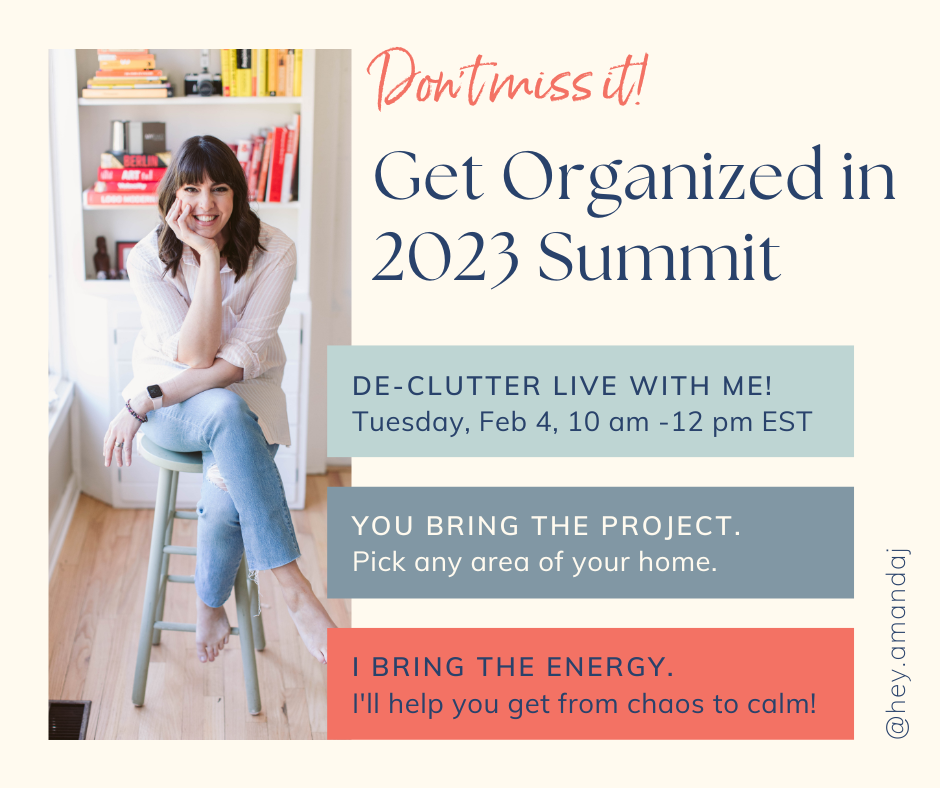
Dump those ideas out of your head and onto paper. Then choose the first item you'll tackle and decide when. (Pssst - I'm hosting a Get Organized in 2023 Summit on Saturday, February 4th where you can de-clutter LIVE with me! See below for details!)
6. Gather your supplies
Here's your decluttering checklist so that you have everything you need for the project:
Contractor bags or strong trash bags if you're clearing out heavy things like clothes, coats or linens
Paper bags or cardboard boxes to carry away delivery items
Sharpies and painters tap or duck tape to label boxes and bags
Your favorite mug with water and/or coffee/tea to keep you hydrated and energized
A playlist if that will keep you going
Information on where you’ll donate. Here are my favorite organizations to donate to.
7. Follow the rules
A few decluttering rules to keep in mind:
Don't leave those bag of donations in the corner for six months. (I see it all the time, my friend.)
Take a break when you need it. If you find yourself spiraling into decluttering despair, take five. Leave the room. Take a few deep breaths. Grab a snack and some water. You've got this.
If it's not a hell yes, it's a no. Be ruthless. Don't hold onto things that you don't truly love or that aren't truly useful. Imagine me there, glaring at you with a knowing look. Then put it in the donate bin.
8. Take before and after pictures
Make sure to take before and after pictures so you can show off your new, shiny, organized space to anyone who will listen!
9. Get extra motivation
And if you need some extra decluttering motivation, I've GOT you, friend. Add THIS to your decluttering calendar. 👇
On Saturday, February 4th from 10:00 am - 12:00 pm EST, I'm hosting a Get Organized in 2023 Summit where you can declutter LIVE with me. Think about it as your own special self-care declutter day where you'll get MAJOR motivation to purge clutter. I'll offer my best tips for getting organized in the new year, and then we'll get to work, with everyone working on an area they've identified. I'll even have special break-out rooms where you can ask me questions when you get stuck!
Click here to add your name to the waitlist and to save the date. Tickets will go live later this month and will only be available for a limited time. Keep your eyes out for early bird pricing!
Just imagine how AMAZING you will feel after you take some time to simplify your space.
See you soon, friend!
Your Last-Minute Holiday Gift Guide
Running a little behind this year?
Me too, friend. 🙋♀️ Me too.
Don't worry. I've got you.
I've compiled some of my favorite last-minute gift ideas, right here. This one is going to short and sweet because time is a tickin', and those holiday wish lists aren't going to take care of themselves.

Running a little behind this year?
Me too, friend. 🙋♀️ Me too.
Don't worry. I've got you.
I've compiled some of my favorite last-minute gift ideas, right here. This one is going to be short and sweet because time is a tickin', and those holiday wish lists aren't going to take care of themselves.
Become best friends with gift cards
At this point in the game, gift cards are going to be your best friend. There are three ways to go:
You can pick up physical gift cards either at the location or at one of those gift card centers in stores and pharmacies.
You can get holiday e gift cards and have them emailed to you (to print and wrap).
You can have the e-gift cards emailed directly to the recipient, usually on a date that you specify.
I prefer the physical gift cards because they usually are very festive and come with cute little envelopes, and you don't have to fuss with a printer. That said, some of my favorite stores and products have lovely printable gift cards.
My favorite ideas for gift cards are below, and I've linked directly to the e-gift card page for each. (You're welcome.)
Balance Bound planners and stationery - Teachers LOVE this line of products from my lovely podcast co-host Brooke Forry and Curious & Co.
Color Guru - I just bought one of these for a friend! (Just click the "Buy for a friend" button.) Get 10% off with code INDIGO.
Restaurant group gift cards - Instead of choosing one restaurant, pick a gift card that gives them access to many restaurants. In the Philly area, I love the Starr Group.
Starbucks or Panera Bread - These are great options for working parents or anyone who is always on the go.
Sephora or Ulta - Perfect for that picky teen wants that that trendy lip gloss that you've never heard of.
HomeGoods - Is there anyone who DOESN'T love Home Goods? I have not met that person yet.
Who Gives a Crap toilet paper - What says "I love you" more than toilet paper? Well, a lot. But this toilet paper is fun, whimsical AND environmentally-friendly.
If you're looking for extra creativity points, you could group a few together to create holiday or Christmas gift themes. For example, maybe you hang the restaurant gift card around a bottle of your favorite wine. Or make it a Gift of Beauty, with both a Sephora and Color Guru gift. Having a theme can help that gift card from feeling so lonely!
Lean into the cozy factor
A few years ago, I poo-pooed the scented candle as a holiday gift. (You must watch this SNL skit about scented candles as gifts.)
But, I gotta say, this year I am all about the cozy holiday gifts. I'm hoping to get some lovely candles, maybe a neutral cozy throw, and I wouldn't turn down some slippers.
These items are usually very easy to find in stores, so they're great last minute gifts. Just try to stick with neutral colors to up your chances of them actually being well-loved.
Keep wrapping easy
Your other best friend, when you're running late, is going to be holiday gift bags. Consider a large Santa Sack, or you could even buy a bunch of brown kraft paper bags that you can write on and/or have the kids decorate.
Whether you're looking for gifts for empty nesters or working parents or just need a few new holiday ideas, I hope you'll find something for everyone on your list with the ideas above!
I'd love to hear from you. What would you add to this list? Maybe some favorite Target holiday gift sets? Other holiday must haves? Ideas for recruiting gift helpers? Holiday gift bag ideas? I'm all ears!

How to Shop Smart on Black Friday
This isn't typical for me ... but I'm getting a leeetle bit excited for Black Friday.
I've got a few favorite companies and products that I've got my eye on. I wanna know what great deals they've got cookin' for the season. And luckily, it feels like the days of people getting in line for Black Friday and waking up at the crack of dawn are mostly gone. (Anyone remember the Cabbage Patch Kid frenzy??) These days, you don't have to shop for Black Friday deals in person. You can shop, mostly from home, in your comfy jammies. (Except for giving love to your local small businesses!)
Here are my top 5 Black Friday tips for how to shop smart during this day/week/month of great sales:

Photo by Claudio Schwarz on Unsplash
This isn't typical for me ... but I'm getting a leeetle bit excited for Black Friday.
I've got a few favorite companies and products that I've got my eye on. I wanna know what great deals they've got cookin' for the season. And luckily, it feels like the days of people getting in line for Black Friday and waking up at the crack of dawn are mostly gone. (Anyone remember the Cabbage Patch Kid frenzy??) These days, you don't have to shop for Black Friday deals in person. You can shop, mostly from home, in your comfy jammies. (Except for giving love to your local small businesses!)
Here are my top 5 Black Friday tips for how to shop smart during this day/week/month of great sales:
1. Keep an eye on your favorite brands now.
So where's the best place to Black Friday shop? Wherever you buy the things you love! I'm signing up NOW to get emails from my favorite brands, especially ones that are a little pricier. That way, I'll be sure to get all the Black Friday secret deals that might not be broadly publicized on their website.
Here are some of my favorites that I'm keeping an eye on: (These are not ads - just brands I love!)
Swell - I LOVE their insulated coffee mugs. My tea stays hot for hours!
Billie - Their razors with the magnet holder for the shower is game-changin'. I also love the dry shampoo (available in a darker shade for darker hair) and the lip balms.
Thrive Causemetics - Thrive is one of my go-tos for makeup products. Their products are cruelty-free, 100% vegan and formulated without parabens, sulfates or latex. I love their Buildable Blur CC Cream and Creaseless Concealer
Prose - I just tried this customized shampoo & conditioner. It's on the pricey side, so I hoped I wouldn't love it ... but alas, I do.
Kizik - Have you heard me brag ad nauseam about my absolute favorite hands-free sneaker that you can put on and take off with just a step? I get compliments on my Women's Athens Bahama style all.the.time.
2. Create a wish list for yourself and others
You might've noticed that a lot of those I listed above 👆 seem like they are for, well, me. 😜They are! I use Black Friday not only as a chance to cross some things off my holiday list but to stock up on items that I've been hoping to upgrade or purchase for some time.
So if you don't actually BUY the items yourself, you might think about using Black Friday as an opportunity to tell those little birdies in your life what you have your eye on. If you're wondering "What should I buy for Black Friday?," think about things you might have wanted to purchase or upgrade for a while. Things like:
New Pyrex storage containers to replace the mismatched mess you've currently got in your Tupperware drawer
That Dyson stick vacuum that's been calling your name
Your favorite makeup brand that rarely has sales
And when you're ready to plan out your gifts for others, the Balance Bound collection just came out with a great gift planner where you can easily plan gifts for everyone on your list, not just for the holidays, but year-round.
3. Ask yourself if you REALLY need or want it.
Before you just google "Amazon Black Friday deals" and start frantically adding things to your cart that look like a good deal, take the time to think about if this is something that you or a loved one REALLY needs in their life.
It's not a "great deal" if you don't really need it. People might rightly ask "does Black Friday really save you money?" and the answer is NO if you buy a bunch of stuff you don't need.
4. Shop small and local.
Use Small Business Saturday as an opportunity to stroll the downtown of your favorite nearby town and show some love to local small businesses. They will often gift wrap on-site. Make a day of it - add lunch, coffee, bring a friend. Oooh, maybe even add in a foot massage.
Lots of towns will publish special events happening all weekend to entice shoppers, like free parking and special treats. For example, here is what my beloved town of Media, PA is doing. I just Googled "small business saturday media pa". Do the same for your town!
5. Do your future self a favor.
Use Black Friday to sign up for courses, memberships or other things that you might not do NOW but might do later. For example, I'm launching a huge promotion with lots of bonuses for my Organized Every Day course. For many people, this will be a "favor to their future self." They'll likely tuck it away until January and start the New Year off with a bang. (Join the waitlist here and be the first to know about this big sale!)
So that's it my friends! I hope you enjoyed these Black Friday shopping tips.
I'd love to hear from you about YOU! What type of Black Friday shopper are you? What deals are you grabbing?

5 Tips for a Holiday Season with Less Stress and More Joy
I love the holidays as much as the next person, but I get a little worried when I start seeing that familiar ol' frenzy kicking in.
We're already stretched thin in our day-to-day lives. Toss in an ongoing pandemic, flu season and THEN cooking, shopping, decorating, wrapping, a small (or large) dose of family drama, and it's a recipe for a total meltdown.
So, this year, I'm taking a beat. I'm sharing with you the 5 things I'm going to do this holiday season to have less stress and more joy. Let's get those holiday ideas started!
I love the holidays as much as the next person, but I get a little worried when I start seeing that familiar ol' frenzy kicking in.
We're already stretched thin in our day-to-day lives. Toss in an ongoing pandemic, flu season and THEN cooking, shopping, decorating, wrapping, a small (or large) dose of family drama, and it's a recipe for a total meltdown.
So, this year, I'm taking a beat. I'm sharing with you the 5 things I'm going to do this holiday season to have less stress and more joy. Let's get those holiday ideas started!
1. Schedule in some happy holidays fun.
Before you start making plans for the holidays, start by making a list of all the things you WANT to do this holiday season. If you could do ONLY the things you love, what would that be? For me, it would be:
Decorating the tree with holiday music playing and a fire going in the fireplace
Putting the garland on the staircase and a wreath on the door with battery-powered lights
Visiting our local light displays and getting hot chocolate or apple cider
Making peanut butter blossom cookies
Eating lots of comfort food (but not necessarily being the one to cook it)
2. Make a list of the things you DON'T want to do.
I had a client confess to me recently that she hates the holidays and she spends the entire season just waiting for December 26 to come. On top of parenting and her full-time job, she cooks, cleans, does all of the gift shopping and wrapping and is even charged with making great-grandma's lasagna - with noodles made from SCRATCH. By the end of the season, she's tapped out and resentful.
Now, I may not have gotten myself into a lasagna-noodles-from-scratch type situation, but I have found myself doing things in the past that felt like a holiday "should" and not a holiday "want."
That included:
Getting a natural tree even though I hated the expense, the pine needles everywhere and the watering
Putting out a bunch of outside lights that ended up looking a little funky
Sending paper holiday cards
Going to holiday parties that I didn't really want to go to
Cooking holiday foods
Buying way too many gifts for people
So, guess what? Those things you hate doing? Ahem. You don't. have. to. do. them. Full stop. Will some people be disappointed? Maybe. Will they get over it? Yup.
3. Find the minimum effective dose.
I love this phrase minimum effective dose from Dr. Christine Carter's book The Sweet Spot. It's all about figuring out how to find that "good enough" sweet spot.
Here are some examples.
Don't like to send holiday cards? Text your closest, far-away friends and ask them if they can do a FaceTime or Zoom call in pajamas over the holidays.
Don't want to decorate your whole yard? Put a wreath on the front door and call it a day.
Tired of all the shopping? Make an agreement with the family that everybody will chose one adult from a hat and all kids have a gift limit of $25.
4. Outsource like heck.
The holidays are a great time to lean on other available resources to get things done. You can only do so much! Think about ways that you let other people, or other tools, do the work for you:
Order battery-powered lights like these for the front door wreath so that it goes on and off at a certain time.
Shop local stores who offer gift wrapping (like Monkey Fish Toys in West Chester, PA) or request gift sacks with your Amazon purchases.
Let the pros do the cooking and order a Thanksgiving dinner to go. Here's an exhaustive list of places like Whole Foods and Bob Evans who will do all the cooking for you. Plus, check out offer from local restaurants.
Schedule a special one-time cleaning of your house before guests arrive.
5. Sketch out a little holiday planner.
Either on a paper or online calendar, sketch out a plan for the holidays.
Add the fun first. Schedule in those things you said you wanted to do. Try Googling "fun things to do for the holidays near me" or "fun holidays for kids near me" to find cool things going on near you that you might not have tried before.
Add in your travel schedule. Decide which days you'll travel (if this applies) and think of ways to make the travel plan more fun. Cool pit stops? Fun snack mix? Books on tape with holiday stories?
Plan a vacation day. Decide on a day (or two) when you'll take a nice, long break. Sleep in late. Stay in pajamas.
Let the kids eat cereal all day. Maybe even book a local hotel with an indoor pool.
So, that's my plan, folks! I'm going to try to take my own advice this year and create a holiday with less stress and more joy.
What about you? What you are YOU going to let go of this year? What can you outsource? What fun can you add?
Try this at home: The 20/20/20 (with freebie!)
It can be SO hard to stay on top of the daily clutter in our lives. We spend all weekend getting the house “just so” only have it all fall apart by Tuesday.
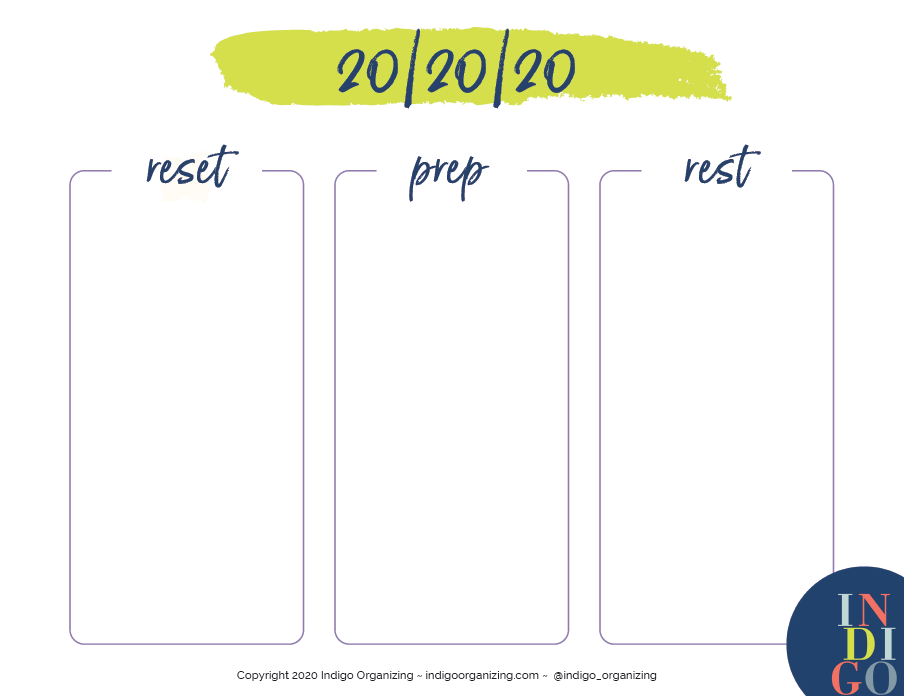
There’s a simple tool that can help. It’s called the 20/20/20. Here, I’m going to teach you how it works AND I’m going to give you a worksheet that you can print out to create your own.
Here’s how it works. Each day, around the same time, you’re gonna set a timer for 20 minutes for three separate chunks of time: Reset, Prep and Rest.
It can be SO hard to stay on top of the daily clutter in our lives. We spend all weekend getting the house “just so” only have it all fall apart by Tuesday.
There’s a simple tool that can help. It’s called the 20/20/20. Here, I’m going to teach you how it works AND I’m going to give you a worksheet that you can print out to create your own.
Here’s how it works. Each day, around the same time, you’re gonna set a timer for 20 minutes for three separate chunks of time: Reset, Prep and Rest.
Chunk 1: Reset from the day (20 minutes)
Take this time to “reset” and clean up from the day’s activities. This might include things like:
Putting folded laundry away
Washing the dishes and wiping the counters
Emptying lunchboxes
Putting dirty laundry in the hamper
Taking paperwork out of backpacks
Putting bills in your “needs attention” folder
Putting toys away (Tip: I tell my daughter that I will donate whatever she doesn’t put away. #truestory)
Chunk 2: Prep for tomorrow (20 minutes)
Take this time to mitigate any snags the next day. You might do things like:
Pick out outfits (like work scrubs or your work-at-home sweatpants for the next day)
Pack lunches, or get the lunch supplies ready
Put out cereal bowls and cereal
Take out something to defrost for dinner tomorrow
Check the calendar and the weather
Put any important paperwork or supplies in backpacks and purses
Chunk 3: Rest and/or primp (20 minutes)
This is where everybody gets to reap the rewards. The kids have been a big help, so reward them.
Make yourself a cup of tea or pour a glass of wine
Take a hot shower
Do some relaxing skin care, like a face mask or exfoliating face wash
Give your nails some love
Let the kids play some video games or have a favorite treat
Do some reading
Surf Instagram
And that’s it! On paper, it may seem like a lot, but once you get moving, time flies. And, if you think about it, if you start at 7:00 pm, by 7:40 pm, you have a clean, clutter-free house and a steaming cup of tea in front of you.
Pro tips:
Get the family involved. Decide who does what during the 20/20/20. Print a separate worksheet for each family member.
Make it fun. Put on music. Try to beat the timer.
Don’t overdue it. When the timer stops, you stop. You can do the rest tomorrow.
By the time Friday rolls around, you will have kept on top of things and you won’t be planning to clean your house ALL WEEKEND.
Soooo, what are you waiting for?! Download your worksheet now! Please note that it’s THREE pages, because I’ve included a sample 20/20/20 to give you lots of ideas, plus some tips to make it work for you.
To download, just enter your email below. (If you’re already on my list, don’t worry - you won’t be added twice!)
Want MORE tips like this? Watch my FREE masterclass and learn all about my new Organized Every Day course. Let’s simplify life FOR GOOD.
Get a one-way ticket out of Should Land.
If you’ve been following me for a while, you’ve heard me talk about “fun & easy.” Here’s the basic premise:
When we spend too much time doing things that: a) we hate doing, or b) we aren’t very good at, we expend a lot of energy that could be going to much better things. We are living in the Land of the Shoulds, the land where you are supposed to just suck it up, and the land where you bang your head against the wall a LOT of the time.

If you’ve been following me for a while, you’ve heard me talk about “fun & easy.” Here’s the basic premise:
When we spend too much time doing things that: a) we hate doing, or b) we aren’t very good at, we expend a lot of energy that could be going to much better things. We are living in the Land of the Shoulds, the land where you are supposed to just suck it up, and the land where you bang your head against the wall a LOT of the time.
Get ready to ditch the “shoulds”
But what if we didn’t subscribe to that idea? What if we got a little bratty? What if we asked instead - what do I LOVE to do? And what am I actually pretty GOOD at? What if I spent MORE time on those things?
That’s what the ol’ “fun & easy” concept is all about. It’s about figuring out how to spend MORE time doing the things that really light us up and spending LESS time on the things that drag us down.
Brain dump your way to “fun and easy”
The tool I’m sharing today is going to give you a shortcut to finding YOUR fun and easy.
Here’s what you’re gonna do:
Head on over to this link to download your worksheet. (If you are new to Indigo Organizing, you’ll be added to my mailing list. If you’re already on it, don’t worry - you won’t be added twice! Just fill in your email and it will take you to the download.)
Brain-dump all of the pesky tasks and projects that you’ve got on your mind. This might be something as simple as “unload the dishwasher” to something bigger like “renovate the kitchen”. (There are categories so that you can divide these into 4 areas: Work, Home, Self and Others.)
You’re going to ask yourself a simple question: Is this fun & easy? Go with your gut. Do you love doing it? Is it fun? Are you really good at it?
If it’s NOT fun and easy, think about how you can downsize it, using Julie Morgenstern’s brilliant 4Ds.
Diminish - What is the minimum effective dose? (You might decide that you can just get the kitchen cabinets painted vs. gutting the whole kitchen.)
Delegate - Is there a person, service, app or machine that could do this? (You might decide to ask your teenager to take over dishwasher duty.)
Defer - Can this wait? (You might decide that now is not the time for any major renovations.)
Delete - Do I need to do this at all? (You might decide that you like hand-washing dishes instead! It’s weird - but that’s what I do!)
Make some notes, like “Delegate to Sammy”. Make sure the notes section spells out the EXACT action you are going to take, like “Call contractor to cancel estimate.”
For the things that ARE fun & easy, get crackin’ on those! Make time in your calendar or to-do list to GET IT DONE.
Observe “fun & easy” in the wild
Here are a few examples of my own examples:
Work: I LOVE giving talks, but I DON’T like planning events. So, I just talk at OTHER people’s events. They plan the event. I show up and talk. That’s Delegate (letting someone else to plan their event).
Home: The interior of our house needs to be painted. DIY-ing it would be so NOT “fun & easy”, so I was ready to hire a pro. I was getting estimates, etc. but then I realized I’m just not up for this project right now, so I’ll revisit it again next spring. That’s Delegate (to a pro) and Defer (to next spring).
Self: My nails look like they belong to a 12-year-old boy. I used to try to paint them myself. I hated it and they looked terrible. Then I tried getting them done. I hated it, and they never lasted. Now I just keep them unpainted, short and neat. That’s Delete (no more painting nails).
Others: Most of my friends have little ones at home so it’s hard to have long phone conversations or Zoom calls. Instead, we send each other voice memos on Voxer or Whats App. That’s Diminish (we find a the minimum effective dose to connect).
Give me the details!
Sooo, tell me, tell me, tell me! What did you learn? What got the boot? What didn’t? What’s gonna change? I’m all ears, so tell me in the comments below.
Don’t forget to download your worksheet right here! Here’s a few hot tips:
If you are new to Indigo Organizing, you’ll be added to my mailing list. If you’re already on it, don’t worry - you won’t be added twice! Just fill in your email and it will take you to the download.
You can either print out the form and fill it out by hand OR you can fill it out right on the PDF.
How to pack for your summer trip (even longer ones!) with nothing but a backpack
Last summer, I got radical with my packing. I was sick and tired of dragging half of my earthly belongings with me on every trip, AND (back when we were still flying), I was sick of paying extra money for luggage.
SO, I challenged myself to pack EVERYTHING that I needed into one large-ish backpack. I even did this for a TEN-day trip to Florida.
Here’s how I did it:
I picked one color palette. I’m already kind of a minimalist dresser, so this one wasn’t too hard. In the summer I wear mostly navy, white and gray, with the occasional pop of color. That way,

Last summer, I got radical with my packing. I was sick and tired of dragging half of my earthly belongings with me on every trip, AND (back when we were still flying), I was sick of paying extra money for luggage.
SO, I challenged myself to pack EVERYTHING that I needed into one large-ish backpack. I even did this for a TEN-day trip to Florida.
Here’s how I did it:
I picked one color palette. I’m already kind of a minimalist dresser, so this one wasn’t too hard. In the summer I wear mostly navy, white and gray, with the occasional pop of color. That way, everything mixes and matches AND you don’t have to bring so many shoes. I ended up taking:
3-4 short-sleeved shirts/tank tops
1 summer dress
1 cardigan
2 pairs of shorts
1 pair of jeans
1 light jacket
1 pair of dangly earrings, 1 pair of stud earrings
1 pair of gold flip flops (these are my all-time favorites - pricier but totally worth it), one pair of taupe sandals and one pair of sneakers
2 bathing suits
2 pairs of light pajamas
1 cute fanny pack or cross-body purse
I wore my bulkiest stuff on the plane. I felt a little like Joey in that Friends episode when he wears all of Chandler’s clothes. I get chilly on airplanes anyway, so it made sense to wear my heavier clothes.
I picked things that could do double duty, like:
My Olio and Osso lip balm that’s also a blush. (This is a splurge for me, but it’s SO worth it.)
A dress that could also be a bathing suit cover-up
Sandals that were cute but also comfortable enough to walk in all day
A fanny pack that doubles as a cross-body bag and a wallet, with credit card slots, etc. (I found one just like this at a consignment shop for $12!)
My iPad so that I could read on the Kindle app and do some occasional work if I needed to
I used a 34-liter backpack with 2 main compartments so that I could pack clothes in the big part and then stuff that would normally go in a purse in the front one. Mine is a pretty inexpensive Coleman backpack that’s since been discontinued, but I’ve got my eye on this bag that avid backpack travelers rave about. (And right now, it’s 60% off!)
Each family member does their own backpack challenge. Help them pick easy outfits and make sure the bag isn’t too heavy for them to carry on their own.
This works best if:
It’s warm weather where you are going, since summer clothes are much smaller.
It’s a pretty casual trip that doesn’t involve lots of fancy occasions.
You have access to laundry, or you’re willing to bring along a small bottle of laundry soap to hand-wash things like bathing suits, bras and underwear.
You can get access to bulkier things like a hair dryer and beach towels at your destination.
You don’t mind wearing something a few times before washing it.
What I loved about it:
You’re hands-free. I sailed through that airport like a pro, and I didn’t have to bat my eyelashes at a stranger on the plane to get help hauling a monster carry-on into the overhead compartment
It’s easy to unpack. It was SO easy to unpack when I got to where I was going. I emptied the backpack so that it was ready for day trips. AND when I got back home, I wasn’t unpacking for days.
Your hotel room or rental stays really neat. The place we were staying didn’t feel overrun with our stuff. No messy suitcases all over the floor. We put our things in a few drawers, and then we had our backpack free for day trips.
Soooo, who’s with me?!?
Leave a comment below and tell me if you’re going to try it.
You’ve got this.
Find the minimum effective dose.
I’m jazzed about a super practical and actionable article in the New York Times this week. It has videos for how to do 3 full-body workouts - and each of them is only SIX minutes long.
Now THAT’s my kinda workout.
I know what you might be thinking:
Six minutes isn’t enough to see real change, or
Six minutes? I feel like I can’t even get six SECONDS to myself. (Oh, I FEEL you.)
But this article is the perfect example of the “minimum effective dose”. I love this phrase, which I first discovered in Dr. Christine Carter’s book, The Sweet Spot.
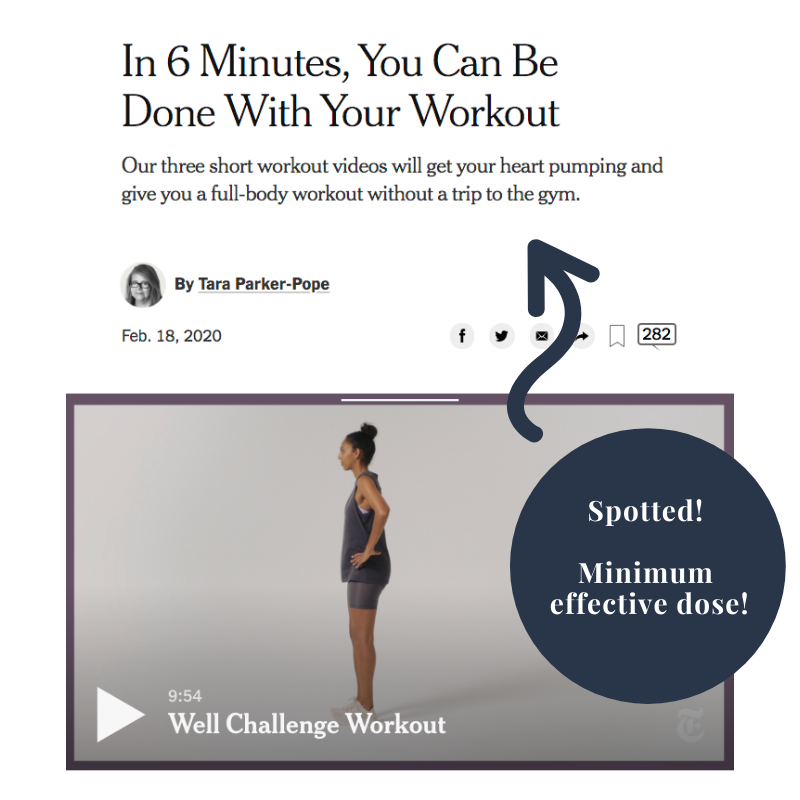
I’m jazzed about a super practical and actionable article in the New York Times this week. It has videos for how to do 3 full-body workouts - and each of them is only SIX minutes long.
Now THAT’s my kinda workout.
I know what you might be thinking:
Six minutes isn’t enough to see real change, or
Six minutes? I feel like I can’t even get six SECONDS to myself. (Oh, I FEEL you.)
But this article is the perfect example of the “minimum effective dose”. I love this phrase, which I first discovered in Dr. Christine Carter’s book, The Sweet Spot.
The idea is to find the minimum effective dose for EVERYTHING.
Don’t have 2 hours to go to the gym and back? Prop up your iPad and do a SIX-minute full-body workout.
Been wanting to meditate but you want to do it “right?” Download the Calm app and do the Daily Calm - it’s only 10 minutes!
Been procrastinating on sending a tricky email? Set a timer for 15 minutes and get it done.
Feeling schlubby? (technical term) Slap on some perfume and lipstick.
Kids are antsy and you can’t get out to a playground? Have them do laps around the house for 15 minutes with silly music.
This little concept packs a powerful punch. Once you start practicing it, you’ll find a million ways to apply it.
And with THAT, I am going to end this blog here. See?! I’m stopping at the minimum effective dose.
PS - As always, I love to hear from you! Tell me how YOU will be applying the minimum effective dose!
Friction: What they didn’t teach you in high school physics
I am LOVING Atomic Habits by James Clear. Today, I am excited to share one big, fantastic nugget from the book - the idea of friction.
You remember friction from physics class, right?
If there's too much friction, that ball won't roll for very long. If there is little to none, that ball will keep rolling, and rolling, and rolling.
When it comes to having more ease and flow in our days, understanding the role of friction is KEY.
Here's how it works:

I am LOVING Atomic Habits by James Clear. Today, I am excited to share one big, fantastic nugget from the book - the idea of friction.
You remember friction from physics class, right?
If there's too much friction, that ball won't roll for very long. If there is little to none, that ball will keep rolling, and rolling, and rolling.
When it comes to having more ease and flow in our days, understanding the role of friction is KEY.
Here's how it works:
Do you want to make something easier? REDUCE friction. That is, "decrease the number of steps between you and your good habits."
Do you want to STOP doing something? ADD friction. That is, "increase the number of steps between you and your bad habits."
“The central idea is to create an environment where doing the right thing is as easy as possible. ”
Reducing friction
Let's look at a few quick examples for how you might REDUCE friction to make things run more smoothly or to encourage a good habit:
putting your keys in the same place every day (to reduce the time getting out of the house)
putting bills on auto-pay (to reduce the influx of paper and stress of paying bills)
setting things on auto-delivery, like your toilet paper! (to reduce the mental load of re-stocking essential household items)
having groceries delivered (to avoid dragging three kids to the store)
putting your dish soap in a pump (to make a daily chore a little easier and faster)
getting a treadmill at home instead of going to the gym (to eliminate the extra time going back and forth)
enrolling in TSA Pre-Check (to decrease travel frustrations)
Adding friction
Now, some examples of ADDING friction to deter bad habits or behaviors:
deleting social media apps off of your phone (to decrease time on social media)
removing junk food from the pantry (to make eating junk food much harder)
wrapping your credit card with questions to ask before you buy something (to curb impulse buys at the store)
removing your phone or computer's auto-fill feature for your credit card (to add one more step to completing that next online purchase)
I am ALL about removing (and adding!) friction to create smoother routines, improve habits and meet those big goals.
What are some ways that YOU add or remove friction to make your days more efficient and easy?
Yes, toilet paper CAN spark joy.
I do this work because I want to help people live simpler, more joyful lives.
So when I come across a product or company that is doing just that, I CANNOT wait to tell everyone about it.
(Ad nauseum. To the point where people are crossing the street when they see me around town.)
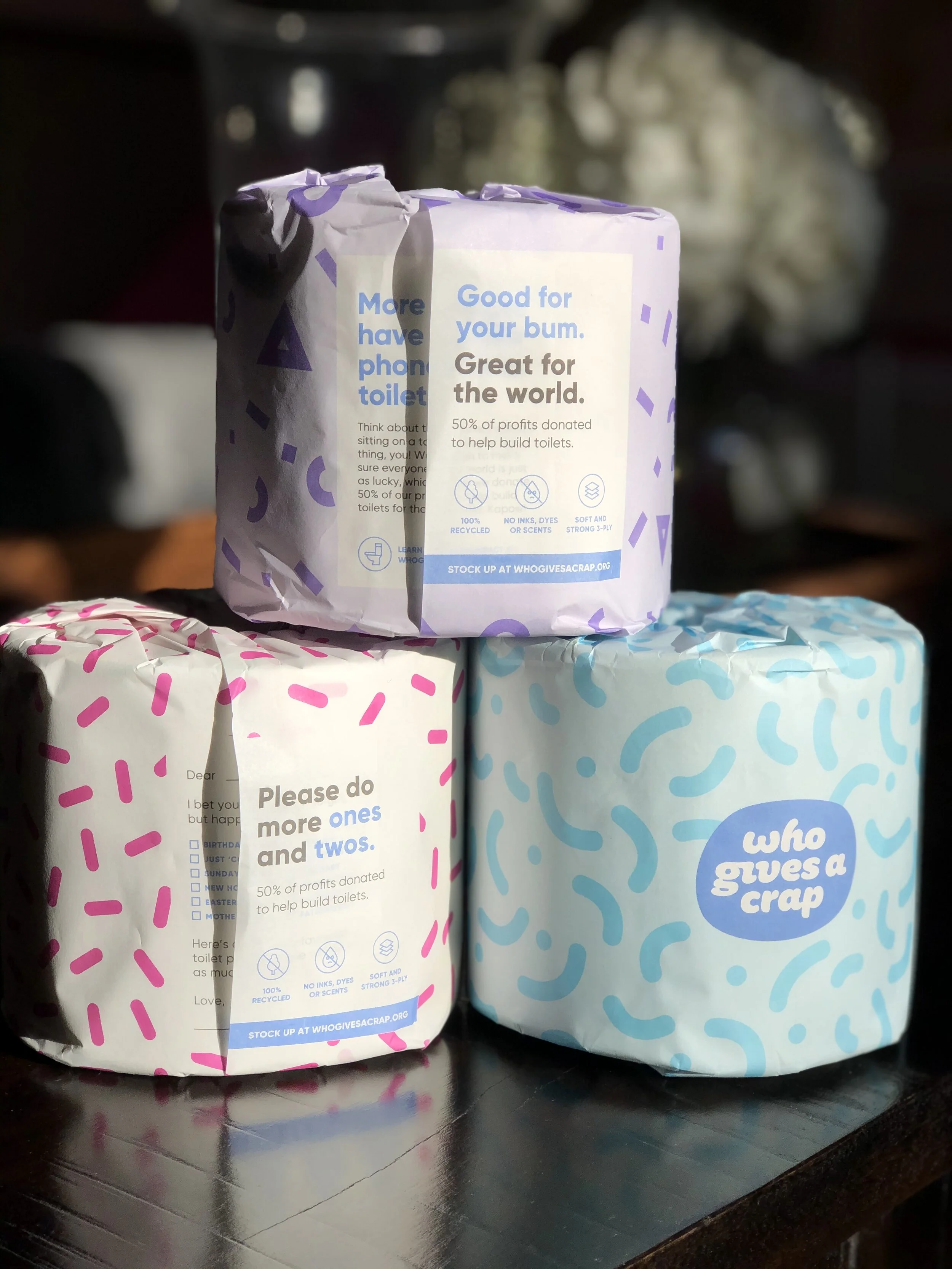
So today, my friends, I want to tell you about something that is sparking some major joy for me - my new toilet paper.
Yes, toilet paper. And it’s made by a company called Who Gives a Crap.
Hysterical, right?
I do this work because I want to help people live simpler, more joyful lives.
So when I come across a product or company that is doing just that, I CANNOT wait to tell everyone about it.
(Ad nauseum. To the point where people are crossing the street when they see me around town.)
So today, my friends, I want to tell you about something that is sparking some major joy for me - my new toilet paper.
Yes, toilet paper. And it’s made by a company called Who Gives a Crap.
Hysterical, right?
I discovered this joyful new company in the cozy Manhattan bathroom of my dear friend Jocelyn, who also happens to be the CEO of IDEO.org. Jocelyn and I are friends from my former days working in international development, and she’s always got the inside scoop on the coolest new social innovations. When I came out of her bathroom inquiring about her colorful (and funny!) toilet paper, she told me all about Who Gives a Crap, co-founded by her friend and former IDEO.org colleague Danny Alexander. Fast forward about two years, and I finally decided to give it a try.
I am LOVING it because it’s a perfect example of what I am trying to preach to my students and clients all the time: It's fun. It's easy. And it does good.
It's fun.
Ok, just look at that packaging. Each roll is colorfully-wrapped with a fun, cheeky message. (Hehe - cheeky!) It's a quick shot of joy in your day. And it's also fun knowing that I am supporting an "underdog" company.
It's easy.
It's on autopilot. Every 5 weeks, it is delivered to my door. Done.
They are doing good.
Their toilet paper is made with 100% recycled paper, and they donate 50% of the profits to help build toilets and improve sanitation in the developing world. (To date, they have donated $1.9 million!)
That's it. Fun, easy and good. Simple and joyful.
So whether or not you decide to delight your bum with this toilet paper, I hope you will see this as an example of how to build more fun, more ease and more impact into the purchasing decisions that you make.
Do YOU have a favorite product, tool or app that makes your life simpler and more joyful? Tell me! Tell me!
(I promise not to cross the street when I see you coming.)
PS - This is not an ad. It's not a paid affiliate relationship. The founders don't even know me and might be a little freaked out by how enthusiastic I am about their toilet paper. But if you DO choose to try it, you can use this coupon code that will get you $10 off your first order, and I'll get $10 off mine. :)
PPS - Interested in finding MORE "fun and easy?" Check out this blog post where I share how I found more fun and easy in my life, and how you can too.
Limit your inputs
Happy New Year! I LOVE this time of year because it feels like a fresh, clean slate. BUT, I often fall into the trap of trying to do TOO much. Can you relate?
Ryan Holiday’s new book, Stillness is the Key, has a whole chapter dedicated to “limiting our inputs”. Holiday says, “it’s very difficult to think or act clearly (to say nothing of being happy) when we are drowning in information.”
Right?!?!
Never-ending news. Unlimited podcasts. SO MANY books. Endless emails, mail, and catalogs. Text chains galore.

Happy New Year! I LOVE this time of year because it feels like a fresh, clean slate. BUT, I often fall into the trap of trying to do TOO much. Can you relate?
Ryan Holiday’s new book, Stillness is the Key, has a whole chapter dedicated to “limiting our inputs”. Holiday says, “it’s very difficult to think or act clearly (to say nothing of being happy) when we are drowning in information.”
Right?!?!
Never-ending news. Unlimited podcasts. SO MANY books. Endless emails, mail, and catalogs. Text chains galore.
Our brains were NOT designed for this.
So this year, I challenge you to limit your inputs. Think about consuming LESS information so that you can focus on what’s TRULY important.
Here are 3 tips to get you started.
Make it a habit to un-follow and unsubscribe.
Be a ruthless unsubscriber of email promotions and newsletters. (Hell, even this one, if it doesn’t float your boat!) Mel Robbins suggests an Un-follow Friday, where you un-follow all the feeds and “friends” that don’t spark joy.
Your email inbox, your social media feeds and your notifications should be filled with information that lifts you up, energizes you, inspires and educates you. Leave behind all the “shoulds” and the “maybe one days” and the “I wish I had thats”.
Get in and get out.
When it comes to news and social media, do a surgical strike.
Do you need to check a Facebook group? Great, go right there. Check it out, and get out. Do not linger on your Aunt Joan’s cat videos. Do not feel pangs of envy as you scroll through your neighbor’s profile featuring all-blonde children making kale chips in matching homemade outfits.
Want to get a news update? Great, access your favorite site, and read for 15-30 minutes. (When you start reading a story about a cat that got stuck in a giant snowball in Minnesota, your time is up.)
With books, go deep before you go wide.
Ok, this is my BIGGEST challenge. There are so many good books out there, and I could make it my full-time job to read them all. #dreams
But that’s just impossible.
So this year, I’m choosing a few “bibles”. Instead of reading every shiny new personal growth book, I’m going DEEP on the books that already made a significant impact on me in 2019. I’ll be ear-marking them, highlighting them, doing the exercises, and squeezing every last drop of wisdom out of them. (Spoiler alert: My #1 bible for 2020 is Atomic Habits. There is some real life-changing magic in this gem.)
Sooooo … will you give limiting your inputs a try! Send me an email and tell me how YOU are going to limit your inputs this year.
Because as Ryan Holidays says …
“Knowing what not to think about. What to ignore and not to do. It’s your first and most important job.”
Wishing you a wonderful year of less noise and more joy, friends.
A Step-by-Step Guide to 4D-ing your Holidays
Don’t panic! It’s just the holidays.
I’m here to help you map out a season with less stress and more joy. And I’ve even got a handy worksheet to help.
One of my absolute favorite tools to teach is the 4Ds, and the holidays are the perfect time to teach it. The 4Ds were pioneered by legendary professional organizer Julie Morgenstern in her book Time Management from the Inside Out, and they are MAGIC.

Don’t panic! It’s just the holidays.
I’m here to help you map out a season with less stress and more joy. And I’ve even got a handy worksheet to help.
One of my absolute favorite tools to teach is the 4Ds, and the holidays are the perfect time to teach it. The 4Ds were pioneered by legendary professional organizer Julie Morgenstern in her book Time Management from the Inside Out, and they are MAGIC.
We’re going to use the 4Ds to break down your holiday season so that you can amp up the joy and bring down the stress.
Here’s how!
Step One: Know the Ds
What are the 4Ds, you ask? They are Delete, Diminish, Defer and Delegate.
1. Delete, aka Don’t Do It at All
When in doubt, Delete. Ask yourself “Do I even need to do this at all?”
Examples:
Hate sending holiday cards? Don’t send them. That's all.
Got an invitation to a party that you don’t want to attend? Send your regrets. That's all.
Limit gifts. In our family, we don’t exchange gifts between adult family members this year, AND we're setting a $25 limit for each kid."
2. Diminish, aka Do It Smaller
This one is my favorite! This challenges us to figure out how we can do something quicker, smarter, easier. It asks the question, “What is the minimum effective dose?”
Examples:
“We don’t need to decorate the entire house for the holidays. Let’s a wreath on the front door and a simple tree.”
"I'm not going to cook for hours for the whole family. I'm going to have a good ol' fashioned pot luck and only cook one dish."
3. Defer, aka Do It Later
Ask yourself, “Can this wait?”
Examples:
"I'm not going to stress about sending holiday cards in December. I'm going to do New Years cards, or better yet, Valentine's Day cards."
4. Delegate, aka Let Someone (or Something) Do It
Take a good list at your to-dos, and strategize where you can bring in some reinforcements. Are there other people, services or machines that can shoulder some of the work?
Examples:
If you decided to Delete gifts between adults, take that money and invest it in a pre-holiday cleaning.
Have groceries delivered.
Order pre-baked pies or side dishes.
Step Two: List out all of your holiday to-dos and activities
Ok, now that you get the idea of the 4Ds, you’re going to jot down ALL of the things you’ve got on your list for the holidays. Write it all down, including things you need to do and things you like to do.
Jot down things like:
Shop for presents
Wrap presents
Pick out a tree
Decorate the house
Send holiday cards
Step Three: Add some joy.
Make sure you write down things that you don’t necessarily already do, but that you would LIKE to do. Things like:
Take the train into the city and see the lights
Go caroling
Try making mulled wine
Do a holiday movie marathon
Step Four: Do the joy test.
For each item on your list, decide if sparks joy. Are you super excited about it? Is it your favorite part of the season? Or do you dread it? Does it feel like a chore?
If it sparks joy, awesome! Proceed full speed ahead!
If it DOESN’T spark joy, think about how you can apply the 4Ds. Can you Diminish, Defer, Delegate or Delete it? Make a note next to that item about how exactly you’ll apply one (or more!) of the 4Ds.
Be creative and be willing to make a change.
You’re ALMOST done! Now comment below and tell me what you are going to 4D. I love to hear what you’re up to!
Happy holidays, friend.
Mama! I’m like Kiki!
It’s going to be a short and sweet one this week because this month has been BONKERS! (I’m already 3 days behind schedule on posting, but who’s counting?)
If you follow me on Instagram, you’ve seen that the joy sparks have been flying up in New York City. I am now officially a KonMari instructor, training the next cohorts of aspiring KonMari consultants. I’m feeling some major ripple effects in motion, as these lovely people prepare to spread out across the world and help so many people create lives that spark joy. Check out all the action!
It’s going to be a short and sweet one this week because this month has been BONKERS! (I’m already 3 days behind schedule on posting, but who’s counting?)
If you follow me on Instagram, you’ve seen that the joy sparks have been flying up in New York City. I am now officially a KonMari instructor, training the next cohorts of aspiring KonMari consultants. I’m feeling some major ripple effects in motion, as these lovely people prepare to spread out across the world and help so many people create lives that spark joy. Check out all the action!
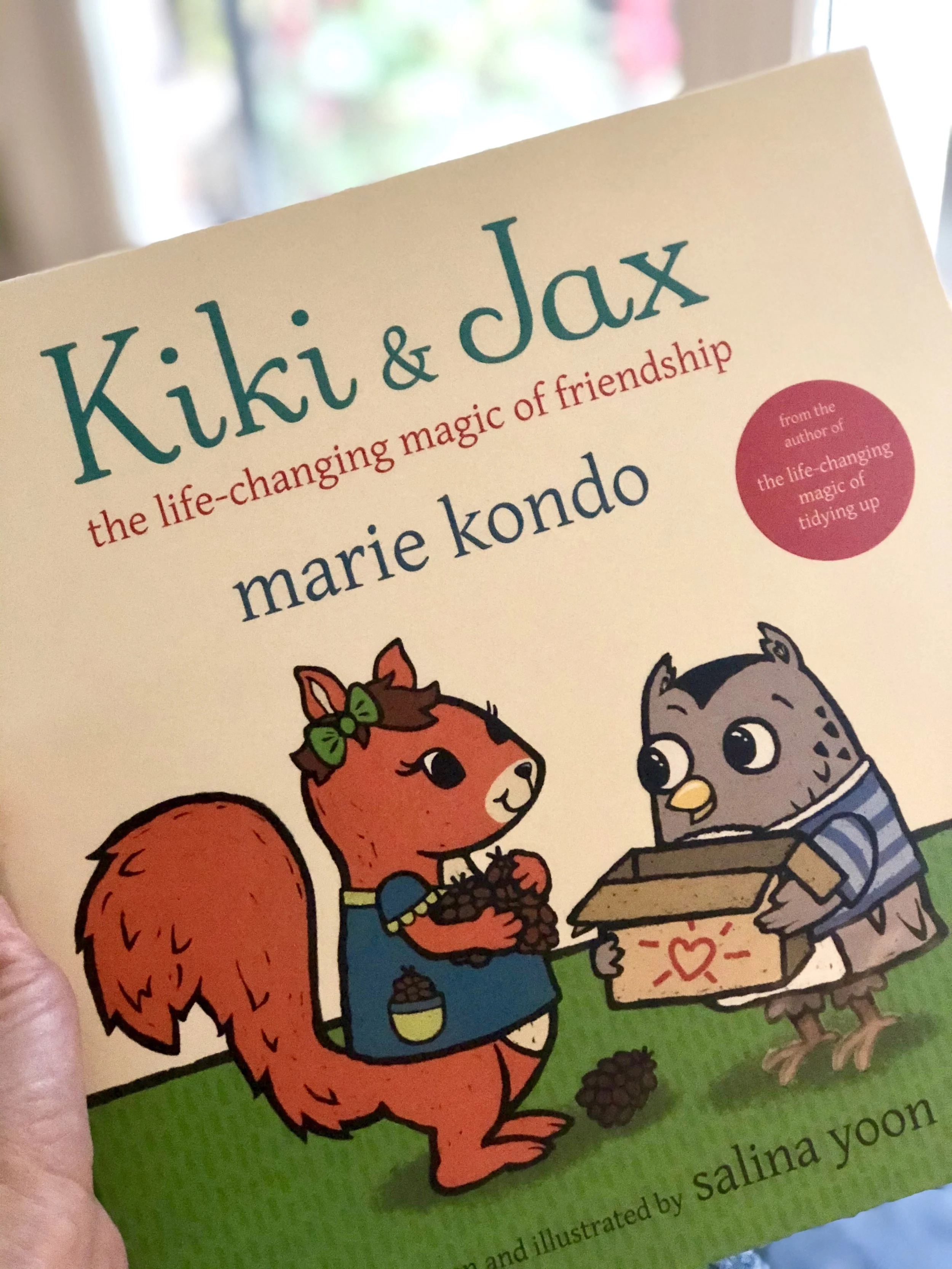
What I REALLY want to talk to you about today is Marie’s new book, Kiki & Jax, which was co-written and illustrated by one of my favorite children’s authors, Salina Yoon.
It dropped on my front step the day it came out, and it debuted in our household at bedtime that very night.
I am smitten. This book is SO DARN CUTE. It’s about a little squirrel who likes to collect and a little owl who likes to tidy. Together, they learn how to make room for the things that spark joy, especially their friendship.
My 7-year-old daughter is a bit of a packrat and has a LOT of attachment to her things, so I was really curious to see how she would react.
Well, my friends, the life-changing magic was practically instant. Here’s a little peek into her reaction at bedtime that first night.
“Mama! I’m like Kiki! I like to collect things.”
“Those boxes that they use to sort their things are SO cute. Could WE make cute boxes for donating?”
“I know it’s bedtime, but can I pleeeeease try this out on a few of my things?” (To which I replied “Um, YEAH! I’m up for a little late-night organizing session ANYTIME.” #introvertpastimes)
“Hmmm …. I’m not letting go of enough. This is harder than I thought…”
“I guess I don’t really need this. I think another kid might like it.”
Even tonight, when I FaceTimed her from the hotel, she immediately brought the phone up to her room and asked if we could do a little virtual session.
YESSSSS.
Even though I help people simplify for a living, sometimes our own family members are our toughest clients. I’m thrilled that she was finally able to understand these concepts in a language that meets her at her learning level.
I envision it being a great conversation starter for parents and kids around how we can make space for the things that we love so that our spaces, and our time together, can be more joyful.
Let me know if you pick up the book and what reactions you get in your household! I’d love to hear!
You’ve got important work to do.
These days, there is a lot of important work to do.
There are wrongs to be made right.
There are children to raise into kind human beings.
There are lives to be improved.
There is beauty to be created.
We don't have time to be bogged down with physical and emotional clutter.
We don't have time to be surrounded by things, people, and activities that drain us.

Photo by Michael Hirsch on Unsplash
These days, there is a lot of important work to do.
There are wrongs to be made right.
There are children to raise into kind human beings.
There are lives to be improved.
There is beauty to be created.
We don't have time to be bogged down with physical and emotional clutter.
We don't have time to be surrounded by things, people, and activities that drain us.
We need all the energy we can muster to do our important work.
Taking the time to clear out your physical, mental, and emotional clutter is a HUGE step in freeing yourself up to do your most important work.
Every day, I have the unique honor of going into my clients' homes to help them de-clutter and simplify their lives. We get into real, deep conversations about how our stuff and our frantic lifestyles are making us feel stressed-out, overwhelmed, and depleted.
Together, we get the stuff and mental clutter out of the way so that they can do THEIR most important work.
It's my small contribution to the world. As Mother Teresa said, "I alone cannot change the world, but I can cast a stone across the waters to create many ripples."
Ready to eliminate what's weighing you down so that you can do YOUR most important work?
There are lots of ways:
Read this blog post, which gives you a step-by-step guide to how to start the first KonMari category - Clothing.
Get inspired at one of my upcoming events and meet others who are ready to get going.
Watch The True Cost documentary. You'll instantly want to buy and have less.
Get to know the impactful organizations where you can donate the things that (used to) weigh you down.
And if you're REALLY ready to get going, let's talk. Contact me here.
Let's get some ripples going, my friends.
We've got important work to do.
Would you wait in line 30 minutes for that?
You’re in line at your favorite store. In your hands, you’ve got a scented candle, a pair of sunglasses, and a mug with a cute inspirational saying. (You should have gotten a cart.)
You’ve also got a shirt that you’re worried might be a little too baggy, or not quite the right color, but it should be fine.
An announcement comes over the loudspeaker that the registers are down and will not be up again for 30 minutes.
Would you wait?

You’re in line at your favorite store. In your hands, you’ve got a scented candle, a pair of sunglasses, and a mug with a cute inspirational saying. (You should have gotten a cart.)
You’ve also got a shirt that you’re worried might be a little too baggy, or not quite the right color, but it should be fine.
An announcement comes over the loudspeaker that the registers are down and will not be up again for 30 minutes.
Would you wait?
Or would you put that stuff down and walk out of the store?
That question is my ABSOLUTE FAVORITE question to teach people who are trying to buy less. It often quickly short-circuits that natural knee-jerk reaction to “treat ourselves”.
This is just ONE of the brilliant questions on Sarah Von Bargen’s (@yesandyesblog) Before You Buy wallet card, and it’s hands down one of the best tools that I have discovered since becoming a KonMari consultant.
Other favorites include: “If I hadn’t seen the price tag, how much would I be willing to pay for it?” or “Will this make my life significantly easier or more awesome?”
If it’s a “no”, it’s ok. Just walk out of the store. Right now.
Put down the candle. Put down the slightly-wrong shirt. Put down the mug with the inspirational saying. Hand them to a friendly sales associate with a wink and a smile and go get yourself a latte instead.
Because really, we have enough. We have too much. We don’t need more.
To get YOUR free wallet card, follow this direct link. And be sure to follow her on Instagram and peruse her site - she has a wealth of information on how to “put your money where your happy is.”
Your house (and your sanity) thank you.
browse the blog
- 2024
-
2023
- Feb 16, 2023 How to Declutter Your Digital Life
- Jan 3, 2023 Quick Wins: Easy Decluttering Projects for the Post-Holiday Lull
-
2022
- Dec 20, 2022 Your Last-Minute Holiday Gift Guide
- Nov 18, 2022 How to Shop Smart on Black Friday
- Nov 11, 2022 5 Tips for a Holiday Season with Less Stress and More Joy
-
2020
- Sep 22, 2020 Try this at home: The 20/20/20 (with freebie!)
- Sep 16, 2020 Get a one-way ticket out of Should Land.
- Jun 23, 2020 How to pack for your summer trip (even longer ones!) with nothing but a backpack
- Feb 25, 2020 Find the minimum effective dose.
- Feb 11, 2020 Friction: What they didn’t teach you in high school physics
- Jan 28, 2020 Yes, toilet paper CAN spark joy.
- Jan 14, 2020 Limit your inputs
-
2019
- Nov 19, 2019 A Step-by-Step Guide to 4D-ing your Holidays
- Nov 7, 2019 Mama! I’m like Kiki!
- Oct 14, 2019 You’ve got important work to do.
- Sep 10, 2019 Would you wait in line 30 minutes for that?
- Aug 27, 2019 The push I needed to start my KonMari journey
- Aug 13, 2019 Is it Fun and Easy?
- Jul 30, 2019 Tired? Try this.
- Jul 16, 2019 How to give your items a second life
- Jun 6, 2019 Camping with a K - Redux Version!
- May 14, 2019 What are your colors?!
- Apr 29, 2019 Spoken from a true KonMari client
- Apr 16, 2019 Don’t get mad. Get specific.
- Mar 25, 2019 The little angel that could.
- Mar 12, 2019 Taking KonMari to Work
- Feb 26, 2019 Let’s invite one another in
- Feb 11, 2019 The life-changing magic of a morning routine
- Jan 20, 2019 Your Netflix questions. My answers.
- Jan 8, 2019 You can do this.
-
2018
- Dec 23, 2018 What’s on your 2019 bucket list?
- Dec 12, 2018 Do a toy detox
- Nov 25, 2018 How to consign
- Nov 9, 2018 What about clothes that don’t fit?
- Aug 28, 2018 The Story of Indigo
- Aug 13, 2018 Life is Not a Pinterest Competition
- Jun 30, 2018 Me and Ray LaMontagne Do the Dishes
- Jun 19, 2018 Camping with a K
- May 15, 2018 Do Something Badly
- Mar 22, 2018 How to Get Dressed (Hint: Wear the Same Thing(s) ALL THE TIME)
- Mar 7, 2018 A Script for Letting Go of "That" Gift
- Jan 31, 2018 How to Buy Less (hint: print this wallet card)
-
2017
- Jul 27, 2017 Yes, you can buy time.