
How to Declutter Your Digital Life
It's time to organize your digital life!
I was recently featured in a Vox article about ways to declutter your digital life. Whether you're trying to figure out how to organize your phone or how to clean out your Gmail inbox, the Vox article is chock-full of super PRACTICAL strategies. You can find the full article here - Easy ways to organize your digital life, from photos to emails.
Below are some highlights from the article, including my favorite ways to jump start your digital decluttering and get your digital life under control, fast. Consider this your digital declutter checklist.

It's time to organize your digital life!
I was recently featured in a Vox article about ways to declutter your digital life. Whether you're trying to figure out how to organize your phone or how to clean out your Gmail inbox, the Vox article is chock-full of super PRACTICAL strategies. You can find the full article here - Easy ways to organize your digital life, from photos to emails.
Below are some highlights from the article, including my favorite ways to jump start your digital decluttering and get your digital life under control, fast. Consider this your digital declutter checklist.
1. Figure out the actual problem.
Often, we make our digital clutter problem bigger than it is. Before you start desperately Googling how to organize your life, it's helpful to take a step back and ask if it's really ALL of the digital stuff that is stressing you out. Or is it just one or two areas, like photos and files? Hone in on what needs the most attention/what's stressing you out the most and start THERE.
2. Start small.
Don't try to build out a big, complicated folder architecture for your electronic documents. Just start with a few simple folders, like Medical Records, School, or Cars. Put files into those folders and add more folders/structure as needed. Consider using a service like Dropbox. It's affordable and easy to use, and your files will be backed up to the cloud. Dropbox even has something called Dropbox Vault, where you can store more sensitive documents under an extra layer of security.
3. Use a naming convention.
From the Vox.com article: "If you have issues finding documents in Google Drive or Dropbox, try sprucing up the way you title your documents, Jefferson says. She likes to start with the date (for example, YEAR.MONTH.DAY) then a few words about the file. Say you’re saving copies of your kids’ report cards; you might use your child’s name and the semester or marking period in the name of the document. " This naming convention makes it so much easier to find and organize digital files!
4. Learn how to use the "labels" in Gmail.
Labels in Gmail are just folders with a fancy name. Get in the habit of labeling emails and then archiving them. This will remove them from your inbox, but they'll stay saved under that label for good.
From the article: "When it comes to email organization, Jefferson suggests creating folders, tabs, or labels if you use Gmail to categorize messages. 'I have a folder for online orders and a folder for my daughter and a folder for certain work projects,' she says. You can move or archive the emails to these specific folders and they’ll be out of your main inbox. It’s important to note that archiving does not delete emails, they’re just moved to another place, so archiving won’t free up any storage space."
Consider fancier apps to clean up email like Superhuman. The $30/month price tag is a bit steep, but I gotta say, I whiz through my emails at lightning speed with this program. (If you love keyboard shortcuts, you'll love Superhuman. For example, just typing "L" allows you to label an email in one step.) It almost makes my email declutter FUN. Almost.
5. Don't be afraid to "go nuclear" and archive.
If you're still stuck on how to clean out your Gmail inbox, don't be afraid to archive. Create one big label/folder called Archive and toss all of your emails in there. If you REALLY need something, you can search for it there later. But it won't be cluttering your inbox in the meantime.
6. Use the cool features already available in your photo apps.
Instead of pulling your hair out as you're purging photos or dealing with a mess of cluttered pictures, try using some of the sophisticated features of many photo apps, like facial recognition and date/time stamps. These features are amazing if you're trying to pull together many pictures of the same person or photos from a specific trip.
From the article: "Because technology on photo libraries has gotten so advanced, you may not even need to do a ton of categorizing, says JR Raphael, the author of the column and newsletter Android Intelligence. Google and Apple Photos allow users to search their images by date, item, and person. 'You can look for practically any characteristic you could think of that would describe an image or images you want to find,' he says. “Words like ‘wedding,’ ‘Halloween,’ ‘canoeing,’ ‘beach,’ color, red, green, purple, or specific text that appears somewhere in the image. So the organization of [photos] becomes superfluous and unnecessary.'”
Here's how you can do that with the photos on your iPhone and here's how Google Photos can even search by people, friends or places, including pets!
My podcast co-host Brooke loves Slidebox to easily organize photos on your phone, and I love Chatbooks to easily turn those favorite photos into photo books.
7. Clear out your phone
No digital cleaning would be complete without cleaning up your phone. If you're wondering how to declutter your phone, my advice is to get ruthless. Here's a great article on how to dump unused apps fast, including by using Apple's Offload Unused Apps feature.
So that's it, my friends! With these seven tips, you can get your digital declutter under control. By taking the time to organize your digital life, you can free up some MAJOR time and mental space for more important things.
Happy digital decluttering!
Quick Wins: Easy Decluttering Projects for the Post-Holiday Lull
This is a GREAT time to do a little decluttering so that you can STOP looking at clutter and START wrapping up in some cozy blankets.
Here are 9 decluttering hacks that I recommend for quick wins with BIG impact.

We did it, friends! We made it through the holidays.
I don't know about you, but I'm pretty pooped! I'm relieved to have the wrapping, shopping, decorating, cooking, holiday cleaning and on and on ... behind me.
This is a GREAT time to do a little decluttering so that you can STOP looking at clutter and START wrapping up in some cozy blankets.
Here are 9 decluttering hacks that I recommend for quick wins with BIG impact.
1. Declutter closets
Decluttering closets is a great place to start. It doesn't have to be a big project like your bedroom closet. You could do the linen closet, the entryway closet, a small hall closet. Whatever could use a little love!
2. Revamp cluttered shelves
Are your shelves overflowing with books, pictures and knick knacks? Take everything off the shelf, really take a moment to look at each item and decide if it "sparks joy" for you. Check out these shelf styling tips by one of my fave designers, Emily Henderson, for inspiration.
3. Clear kitchen counters
Our kitchens are the workhouses of our homes, so decluttering kitchen counters is a one-way ticket to much more efficiency and ease in the kitchen. Take stock of what's living on your kitchen counter. Give everything a nice wipe down. Really ask yourself - does this NEED to be here? How often do I use this? Could I store it away in an easily-accessed location to free up more counter space and make the counter easier to clean?
4. Create an inviting social space
You might not be up for hosting so soon after the holidays, but do take some time to get ready for company at some point. In our house, we just re-arranged and decluttered our living room and now I'm itchin' for someone to knock on my door so that I can say "come on in!" We put games on our coffee table and set cozy blankets around. How can you make your spaces more inviting?
5. Make a decluttering list
If the above ideas don't strike your fancy, make a quick list of areas that are driving you nuts. List all of them! Think of a smaller project where you can get a quick win, like:
the condiments in your fridge
the junk drawer in your kitchen
your spices
toy bins
junk mail
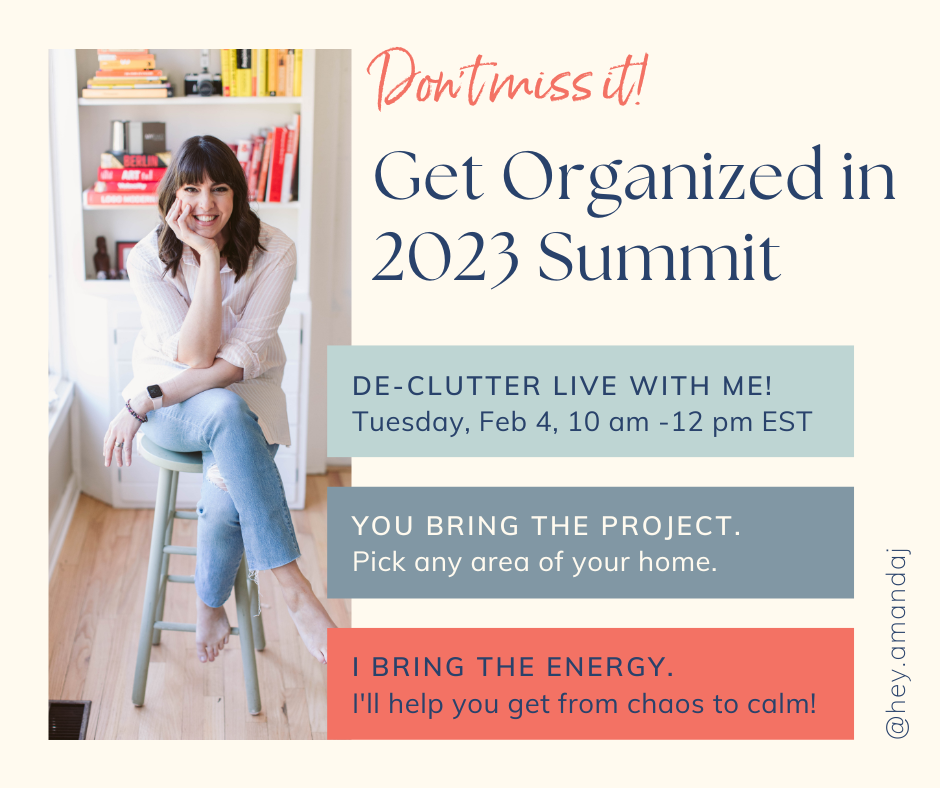
Dump those ideas out of your head and onto paper. Then choose the first item you'll tackle and decide when. (Pssst - I'm hosting a Get Organized in 2023 Summit on Saturday, February 4th where you can de-clutter LIVE with me! See below for details!)
6. Gather your supplies
Here's your decluttering checklist so that you have everything you need for the project:
Contractor bags or strong trash bags if you're clearing out heavy things like clothes, coats or linens
Paper bags or cardboard boxes to carry away delivery items
Sharpies and painters tap or duck tape to label boxes and bags
Your favorite mug with water and/or coffee/tea to keep you hydrated and energized
A playlist if that will keep you going
Information on where you’ll donate. Here are my favorite organizations to donate to.
7. Follow the rules
A few decluttering rules to keep in mind:
Don't leave those bag of donations in the corner for six months. (I see it all the time, my friend.)
Take a break when you need it. If you find yourself spiraling into decluttering despair, take five. Leave the room. Take a few deep breaths. Grab a snack and some water. You've got this.
If it's not a hell yes, it's a no. Be ruthless. Don't hold onto things that you don't truly love or that aren't truly useful. Imagine me there, glaring at you with a knowing look. Then put it in the donate bin.
8. Take before and after pictures
Make sure to take before and after pictures so you can show off your new, shiny, organized space to anyone who will listen!
9. Get extra motivation
And if you need some extra decluttering motivation, I've GOT you, friend. Add THIS to your decluttering calendar. 👇
On Saturday, February 4th from 10:00 am - 12:00 pm EST, I'm hosting a Get Organized in 2023 Summit where you can declutter LIVE with me. Think about it as your own special self-care declutter day where you'll get MAJOR motivation to purge clutter. I'll offer my best tips for getting organized in the new year, and then we'll get to work, with everyone working on an area they've identified. I'll even have special break-out rooms where you can ask me questions when you get stuck!
Click here to add your name to the waitlist and to save the date. Tickets will go live later this month and will only be available for a limited time. Keep your eyes out for early bird pricing!
Just imagine how AMAZING you will feel after you take some time to simplify your space.
See you soon, friend!
browse the blog
- 2024
-
2023
- Feb 16, 2023 How to Declutter Your Digital Life
- Jan 3, 2023 Quick Wins: Easy Decluttering Projects for the Post-Holiday Lull
-
2022
- Dec 20, 2022 Your Last-Minute Holiday Gift Guide
- Nov 18, 2022 How to Shop Smart on Black Friday
- Nov 11, 2022 5 Tips for a Holiday Season with Less Stress and More Joy
-
2020
- Sep 22, 2020 Try this at home: The 20/20/20 (with freebie!)
- Sep 16, 2020 Get a one-way ticket out of Should Land.
- Jun 23, 2020 How to pack for your summer trip (even longer ones!) with nothing but a backpack
- Feb 25, 2020 Find the minimum effective dose.
- Feb 11, 2020 Friction: What they didn’t teach you in high school physics
- Jan 28, 2020 Yes, toilet paper CAN spark joy.
- Jan 14, 2020 Limit your inputs
-
2019
- Nov 19, 2019 A Step-by-Step Guide to 4D-ing your Holidays
- Nov 7, 2019 Mama! I’m like Kiki!
- Oct 14, 2019 You’ve got important work to do.
- Sep 10, 2019 Would you wait in line 30 minutes for that?
- Aug 27, 2019 The push I needed to start my KonMari journey
- Aug 13, 2019 Is it Fun and Easy?
- Jul 30, 2019 Tired? Try this.
- Jul 16, 2019 How to give your items a second life
- Jun 6, 2019 Camping with a K - Redux Version!
- May 14, 2019 What are your colors?!
- Apr 29, 2019 Spoken from a true KonMari client
- Apr 16, 2019 Don’t get mad. Get specific.
- Mar 25, 2019 The little angel that could.
- Mar 12, 2019 Taking KonMari to Work
- Feb 26, 2019 Let’s invite one another in
- Feb 11, 2019 The life-changing magic of a morning routine
- Jan 20, 2019 Your Netflix questions. My answers.
- Jan 8, 2019 You can do this.
-
2018
- Dec 23, 2018 What’s on your 2019 bucket list?
- Dec 12, 2018 Do a toy detox
- Nov 25, 2018 How to consign
- Nov 9, 2018 What about clothes that don’t fit?
- Aug 28, 2018 The Story of Indigo
- Aug 13, 2018 Life is Not a Pinterest Competition
- Jun 30, 2018 Me and Ray LaMontagne Do the Dishes
- Jun 19, 2018 Camping with a K
- May 15, 2018 Do Something Badly
- Mar 22, 2018 How to Get Dressed (Hint: Wear the Same Thing(s) ALL THE TIME)
- Mar 7, 2018 A Script for Letting Go of "That" Gift
- Jan 31, 2018 How to Buy Less (hint: print this wallet card)
-
2017
- Jul 27, 2017 Yes, you can buy time.